TryHackMe — Hackfinity Cloud Challenge 1 Writeup

Cloud Sanity Check
The goal of this challenge is to identify and exploit misconfigurations in AWS services to retrieve a hidden flag. Use the credentials below to access the resources.
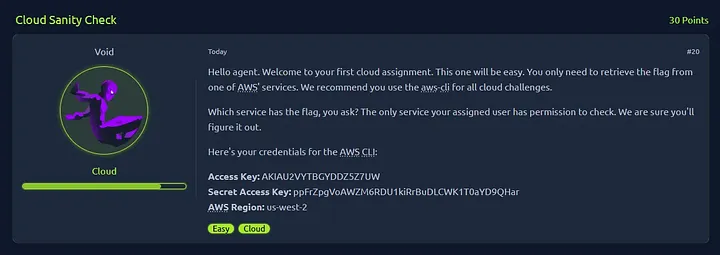 AWS Credentials
Listing AWS IAM Users
I began by attempting to enumerate available AWS resources using the provided credentials. My initial focus was on listing IAM users, S3 buckets, and Lambda functions to identify potential avenues for privilege escalation or data retrieval.
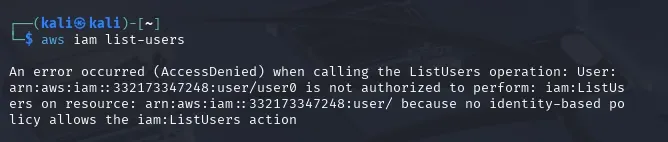 List IAM Users
1
aws iam list-users
After executing the command, I got an error (AccessDenied). It says there that I don’t have the permission to list IAM users. No Identity-based policy allows the iam:ListUsers action. Since listing IAM users was restricted, I pivoted to enumerating other services that might reveal sensitive information.
Same thing happened when I checked the services I’m allowed to interact with using the command below:
1
aws service-quotas list-services
This gives me an idea of what’s available, which could help me figure out where to look for possible vulnerabilities or misconfigurations. But, unfortunately, still no luck at all.
Checking AWS S3
Since I don’t have permissions to list IAM users, I now wanted to check S3 buckets if there are publicly available bucket to exploit.
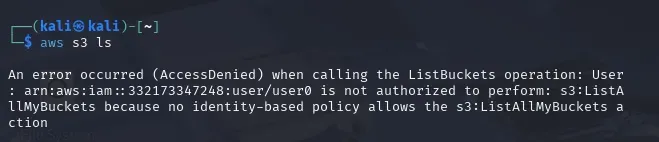 List S3 Buckets
1
aws s3 ls
Still, with no luck, I got an error (AccessDenied). This is because I do not have the permission to list S3 buckets. The user does not have an identity-based policy that allows the s3:ListAllMyBuckets action. After encountering a permission error, I decided to check for Lambda functions that might be accessible.
Listing Lambda functions
I attempted to list lambda functions, but yeah, I do not have permissions for this.
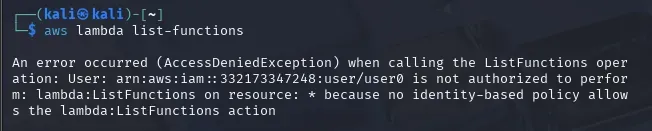 List Lambda Functions
AWS Secrets Manager
As I was browsing what are the Key AWS Services, I found an interesting service called SercretsManager. I read its documentation and thought this service might have the flag I am looking for. Using the command below:
1
aws secretsmanager list-secrets
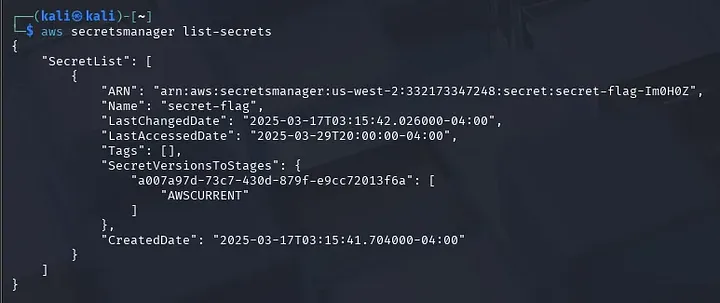 List Secrets
And there we go!!! I finally found the flag. Easy Peasy Lemon Squeezy
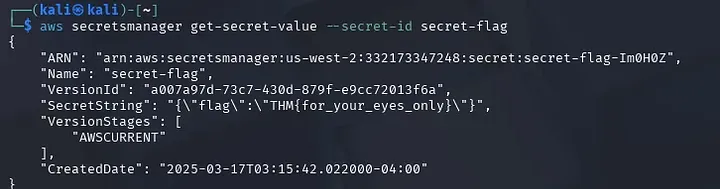 {Flag Found}